Caching, Indexes, and Laravel: Surviving Scale with a WordPress Core over 8 Years
In 2017 I launched a tiny WordPress podcast service for my local church. Eight years and tens of thousands of users later, it's still alive — here's the honest journey of scaling it without a rewrite.


In 2017, I launched a tiny WordPress-powered podcast service for my local church. Eight years and tens of thousands of users later, it's still alive — and still evolving. Here's the messy, honest journey of scaling it without rewriting everything from scratch.
Fun fact: the podcast shows hosted on this platform can be found on both iTunes and Spotify.
Since we needed something up quickly, I put together a few WordPress plugins to get things running — I even wrote a couple myself to fill gaps the off-the-shelf plugins didn't cover. The main plugin (developed by Castos) handles the heavy lifting. I'll share the setup details in a later post.
Initial setup: shared hosting
The service launched on shared hosting at TMD. It was responsive at first, but as the numbers grew, things started slowing down. I moved to cloud hosting at TMD — still shared, just with more resources. As expected, it scaled for a short time before slowing down again.
From shared hosting to VPS
I moved to a Virtual Private Server. Apache and MySQL were both running on the same box. That gave a solid boost, but rapid user growth ate through it quickly.
Checking bandwidth usage made the next problem obvious: streaming media files directly from the VPS was becoming a serious bottleneck.
Offloading media to DigitalOcean Spaces
There were a lot of audio and image files to move, but a plugin made it manageable — transferring everything to DigitalOcean Spaces through the WordPress admin GUI. After that, a lot of load left the server and it stayed performant for a while.
But CPU usage started creeping back up toward 100%, and without proper observability tools, I couldn't tell exactly why.
Splitting the database onto its own server
I provisioned a separate server just for MySQL, keeping both servers in the same zone with private IPs so communication stayed fast. It didn't move the needle much on its own, but it removed the database from the application server's resource contention.
Around the same time, an analytics plugin was noticeably slowing down certain pages. I used a query tracking plugin to identify the culprit — a poorly constructed query with no appropriate index. Adding a composite index resolved it. Not a dramatic win, but one less bottleneck.
Real gains: page caching
Podcast episode pages were being regenerated on every request despite rarely changing. Caching them with a caching plugin was the first time I saw real performance gains — the site became as responsive as it was at launch in 2017. The plugin could even warm the cache in advance by crawling all pages. I thought we'd never need to optimise again.
We did.
Plugin bloat
By this point, I had accumulated a fair number of plugins for "nice to have" features. With Datadog now integrated, I could see the number of database queries per request — and every plugin was contributing. I removed the ones that weren't essential. Not a major win, but necessary housekeeping.
A surprising bottleneck: the podcast feed
The most visited endpoint on the entire platform is the podcast feed URL. Every time a listener pulls to refresh their podcast app, it hits that endpoint. Web crawlers do the same. With hundreds of episodes, generating the full feed XML on every request was expensive.
I tried limiting the feed to only the most recent episodes, thinking listeners would visit the website for older content. A few hours later, I had a flood of complaints — users had been trained by years of habit to search for episodes directly in their podcast apps, not on the website. I reverted.
Caching the feed with the WordPress caching plugin didn't work reliably either. The feed has its own headers and expiry semantics that most page caching plugins don't handle well. I had to move on.
Laravel to the rescue
At this point, I had done everything WordPress allowed and the platform was still struggling under load. I considered a full rewrite, but that felt like far more work than the situation warranted.
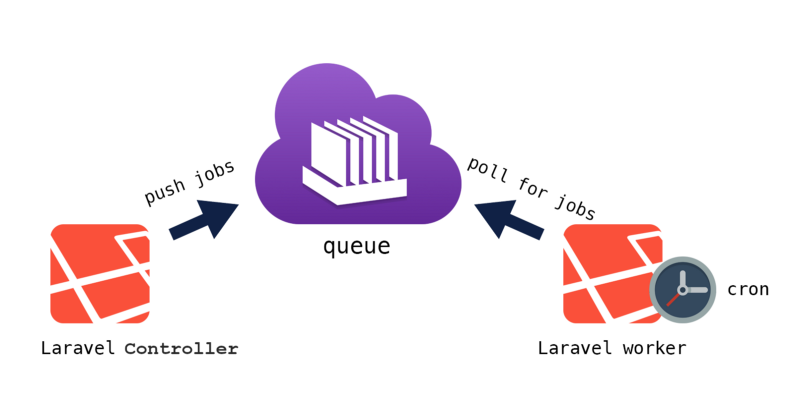
Instead, I took a "microservice-ish" approach: write a thin Laravel layer responsible only for serving the podcast feeds — the most-visited part of the service — while WordPress continued to run the website and admin portal.
The Laravel layer works simply:
- It periodically fetches the podcast feeds from WordPress and caches them locally
- All feed requests from podcast clients hit Laravel, not WordPress
- WordPress only generates the expensive feed XML a few times a day rather than on every request
This change significantly improved the service and it has continued to scale well since.
The thin layer is open source: github.com/brytey2k/podcast-speedster
Key lessons from 8 years of scaling
WordPress is fast to start, but doesn't scale without planning. It's a great foundation, but every plugin you add brings queries, and those queries compound.
Moving media off the server makes a real difference. Object storage like DigitalOcean Spaces or S3 is cheap and removes a significant class of load from your web server.
Caching is critical — but it doesn't fix everything. Page caching delivers dramatic wins for content that rarely changes. It doesn't help with dynamic endpoints like XML feeds.
Laravel and WordPress can coexist. You don't have to choose one or rewrite the other. A thin, focused Laravel service sitting in front of WordPress's most expensive endpoints can buy you years of headroom.